
Step-by-Step Guide to Getting a Static IP Address

When you access the internet on your home network, you’re almost always using a dynamic IP address. That means it changes each time you connect. Dynamic IPs are generally the default for most Internet Service Providers (ISPs) when they set up private, individual home networks. But you can get a static IP address instead, if you want one. If you are not sure whether you need a permanent address or just a temporary switch, it helps to know how to change IP on your current setup first.
As the name implies, a static IP address doesn’t change. Although it’s generally considered safer to use a dynamic IP, there are some situations that warrant the use of a static IP address. This guide will walk you through the difference between static and dynamic IP addresses and how to get a static IP address on your computer or mobile device. You may also check IP services.
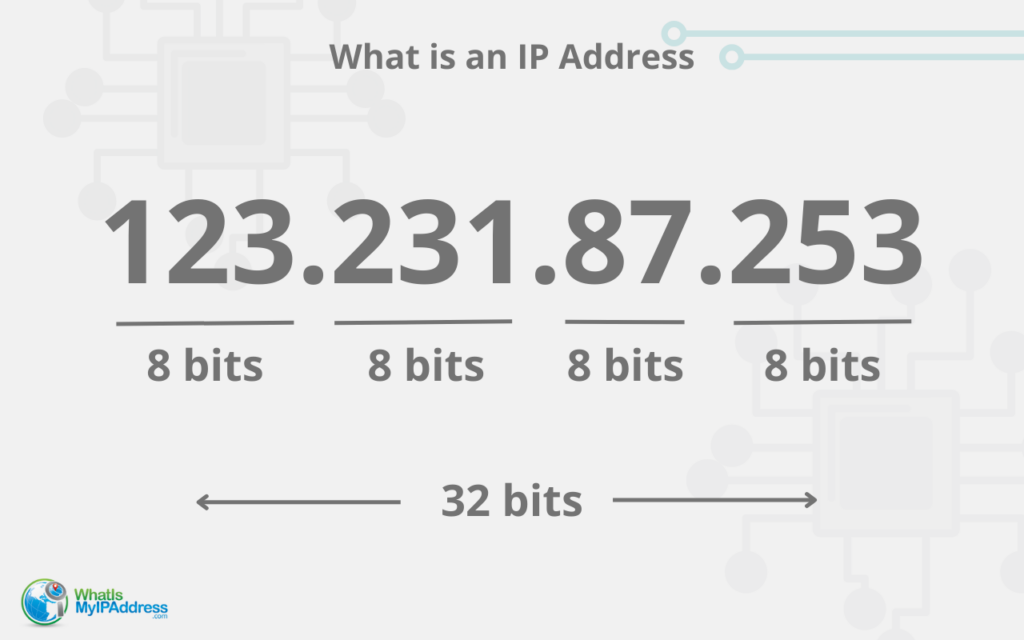
What is an IP Address?
An Internet Protocol (IP) address is a unique set of numbers assigned to each device that accesses the Internet. This number follows a specific format: four sets of numbers separated by a “dot.” The IP address contains geolocations and other identifiers that enable devices to send and receive information to each other.
There are two types of IP addresses, dynamic and static.
Dynamic IP address
Internet Services Providers typically issue a dynamic IP address when you’re setting up devices because it saves money for the provider and for you. It’s reliable and automatic, and it won’t cost any additional money to use the provided IP address.
As the name implies, a dynamic IP address changes intermittently, meaning you may have a different IP address every time you log on. There are a few reasons you may need to know your address, including troubleshooting your device or connecting remotely. There are services to help you find your unique address, no matter how many times it changes.Dynamic means “constantly changing.” The prefix dyna- means power, but dynamic IP addresses aren’t more powerful. They can simply change from time to time
Dynamic IP addresses are usually sufficient for casual browsers and home use, but if you’re a business owner, a user who needs to have a geolocation in another country, a gamer, or someone who wants to add an extra layer of security to your network, you should consider upgrading to a static IP address.
Static IP address
A static IP address is fixed, meaning it never changes. These are preferred for computers set up as servers, for devices sharing a printer, or to connect to the server from anywhere. They provide more reliable geolocations and increase network security. They also equip users with more capabilities and additional control over network connections, including increased reliability and consistent availability. Static means constant. Static. Stand. Stable.
Businesses can use a static address for strategic purposes such as hosting and creating servers, using VPNs, and assigning dedicated services including email. Static IP addresses can be chosen in any geolocation, regardless of your physical location, which makes them a flexible option for international operations.
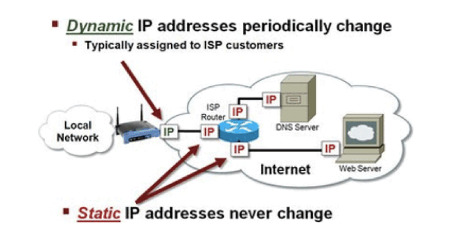
Demystifying IP addresses and DNS
An IP address and DNS are both systems for identifying users in a network. The IP address acts as a physical address for a device, while DNS names them for easier searches.
The DNS (Domain Name Server) stores all IP addresses and their corresponding domain names, such as https://whatismyip.network, into one database. When you type the domain name, the DNS translates your request into an IP address search. Once the IP address is found,the website is loaded. Think of DNS as a phone book storing all phone numbers and corresponding names in one place. Since it would be impossible to remember every IP address for sites you visit, DNS tracks the related IP address for you.
More on Dynamic IPs
You’ll read most everywhere that a dynamic IP address can change “at any time.” This is true, but it doesn’t mean that it happens frequently. The fact is, even if you have a dynamic IP address it may not change for months on end.
And if it does, it’s really not a big deal. Why is that?
Because ultimately, all an IP address does is keep you connected. There are a few more reasons you can feel good about a dynamic IP address:
- It doesn’t cost you anything extra.
- It’s carefree, automatic, and reliable with very little work on your end.
- Your geolocation might be less accurate (if that matters to you).
- For your ISP, it’s the most efficient use of IP addresses.
The “dynamic” part comes from something called DHCP, or Dynamic Host Control Protocol. It all happens in the background. Technically, your computer or device “leases” (at no extra charge) an IP address to get connected.

For instance, your upload and download speeds will be faster with a static IP address. You may not really notice, anyway, and most people get used to the service and speeds they get and never worry about a few lost milliseconds. Besides, you can increase your speed with a plan upgrade.
Another drawback is that you can’t set up a reliable server with a changeable IP address. But most of us don’t care about that. We just want to game, shop, check our emails, and look at videos of kittens on YouTube.
More About Static IPs

If your IP address at home is static, it means that it will remain the same every time you connect to your home network.
Just keep in mind that an IP address doesn’t travel with you. If you took your laptop to a coffee shop and used their wireless network, that IP address would be different. But on your home network, your static IP address would always be the same.
Let’s dig a little deeper into a static IP.
As you’ve already learned, a static IP never changes. It will be the same every time you log on to your home network whether it’s today, next week, or next month.
Static IP addresses increase network security and control over connections. Having a static IP address will give users consistent availability and improve reliability as well as provide you with a fixed geolocation.
Users who create and host servers are among those who benefit most from a static IP address. They are the preferred choice for businesses who need to assign email and other dedicated services. Static IP addresses are a great choice when you’re connecting via VPN as well.
Static IP addresses can be chosen in any geophysical location across the globe, making them a flexible choice for international operations of any kind, whether it’s strategic business usage or gaming, streaming, or browsing in a country that bans users from other countries. China and Russia, for example, have built complex firewalls to block international users from most of their sites, but users with know-how will use certain devices, some of which will have static IPs, to get around those.
Why use a static IP address
While dynamic IP addresses are fine for casual browsers, there are times when setting up a static IP address makes more sense.
Simpler for administrators
For administrators, static IP addresses are simpler to maintain. Dynamic IP addresses require programs that change or assign the addresses and users may need to change computer settings. Static addresses make it easier to assign access and permissions and track Internet traffic.
Hosting servers
Remote access to closed networks works better with a single, dedicated IP address. These fixed addresses allow different computers and operating systems to search for a single IP address. This consistency also allows computers to find the server, no matter where it is physically located.
Easily connect with your computer
In today’s remote world, it’s important to be able to find files and other information stored on your computer, even when you’re not near it. A static IP address allows users to connect with their computers from anywhere by using VPNs. If a device is connected, all information stored in it is accessible.
Setting up your own email server
There are many reasons you may want to set up your own email server, from privacy issues to filtering unwanted communications, so you can be in control of your own messaging.
VoIP reliability
A static IP address increases the reliability of your VoIP calls as well as apps such as Skype, Zoom, Google Meets, and Facetime.
Increased speeds
Transferring files, uploading documents, and downloading content through a static IP address is faster than devices assigned dynamic ones.
Enhanced security
Dynamic IP addresses are more secure because they are constantly changing, there are additional security layers with static ones that help to ensure that any potential security problem is prevented.
Better tracking
Static IP addresses provide more accurate geolocation data. This is beneficial whether you’re mining geographical data from visitors to your site, as well as ensuring your business’ location is accurate in local listings.
Sharing devices and resources
If your family or office shares devices, such as printers, giving those devices static IP addresses makes them easier to discover and connect to your users’ personal devices.
Getting a Static IP
Generally, a static IP address is assigned by request and for a fee by an IT administrator at your place of work, but you can set one up on your home network.
Static IP addresses will cost you a small monthly fee, generally starting at around $15 per month on average for a single IP. You will need to contact your ISP (internet service provider) to obtain your static IP address.
Have your account information handy, as well as your current IP address that you found on our home page.
Your ISP may also request a MAC address (media access control address), which will be six sets of two characters each separated by colons. It will be configured like this: 12:34:ab:56:7c:8d.
It may take a few days for your ISP to issue the new address. Once your ISP provides you with the new IP address, simply install it on your device by following the guide below:
How to set up a static IP address
You will need to contact your Internet Services Provider (ISP) for a static IP address. Once you receive this, setup is straightforward. You can set it up on your Mac, PC, Android, or iPhone — basically any device that uses an IP address.
Mac
- Click the Logo and find About Mac > System Preferences > Network
- Choose your network
- Click Advanced
- Choose the TCP / IP option from the top menu
- Click Configure IPv4 and choose Manually
- Find gateway and DNS information in System Preferences > Network and choosing Advanced > TCP/IP tab for WiFi
- Enter the new IP address in the IPv4 Address field
- Don’t forget to click apply when you’re finished
Windows 10
- Open the settings app on your computer
- Choose Network and Internet option from the list on the left
- Select the connection you are using
- Find the IP assignment manage known networks > properties > IP settings
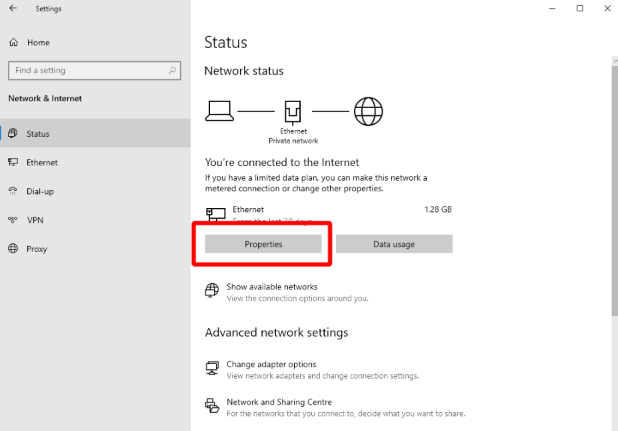
- Select edit under IP assignments
- Select Manual from the options
- Select IPv4 and toggle to on
It’s a simple process to switch to a static address, and for businesses and individuals with more complicated internet needs, it’s a great decision.
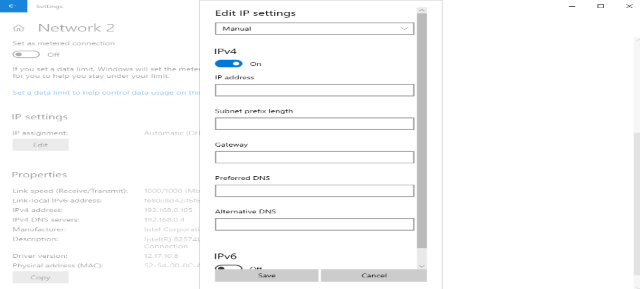
- Enter the static IP address
- Enter 24 in the Subnet prefix length field
- Find your gateway and DNS by typing ipconfig/all into the command window
- Add the gateway information in the field
- Add the preferred DNS address and, if available, the alternate DNS address
- Remember to click save when you’re finished
How to set up a static IP address on mobile
Your mobile device needs an IP address when it connects to the Internet and it usually gets assigned a dynamic one. You can change it so it’s a static IP, however. You’ll need the static IP address your ISP provided you with.
Android
- Open your Settings and select Connections and then Wi-Fi.
- Select the gear icon or settings for your current network.
- Select IP settings and then Static.
- Type in your static IP address.
- Select Save.
iOS
- Go to your device Settings and then select Wi-Fi.
- Select Network.
- Under IPv4, select Configure IP. Then select Manual.
- Input your static IP address.
How to set up a static IP address with a router
It’s possible to change the IP address of any device on your network using your router as well. In addition to having a static IP address ready to go, you’ll also need the MAC address of the device you wish to change the IP for. Also, that device must be connected to the router.
Not sure what a MAC address is? Read our guide to MAC addresses to learn all about it.
- Type your current IP address into your web browser’s search bar. This will lead you to your router’s configuration page.
- Find a section on your configuration page that is named LAN setting, static IP addresses, DHCP reservations, or something similar.
- Input the MAC address of the device on your network that you want to configure.
- Input the static IP address you would like to assign to that device.
- Save your changes.
Note that not all routers use the same systems; it varies by brand. The instructions might vary slightly for your specific router.
Is it free to have a static IP address?
Most ISPs will charge you an extra fee for having a static IP. Some ISPs charge a very small fee or may even offer a static IP address for free if you’re using one of their routers, but most of the time, you’ll have to pay for one from an ISP.
Asking your ISP isn’t the only way to get one, however. You could also try one of the following methods:
- Some free Dynamic DNS (DDNS) providers offer the use of a free static public IP when you sign up with their services.
- Some VPN services offer access to a static IP on their private networks with no additional cost. You generally have to pay for the VPN service before you can get access though.
- Cloud computing platforms like Amazon Web Services (AWS), Microsoft Azure, and Google Cloud Platform (GCP) offer some free credits for new users. You can use one of these services to set up a virtual machine and apply your free credit toward a static IP address.
Is a static IP address risky?
For individual and home use, static IP addresses aren’t as secure as dynamic ones. They never change, so the chances that someone can locate it and gain access to your network are higher. They can also be attacked multiple times because cybercriminals only have to identify you once. Generally, static IP addresses are easier to track.
Dynamic IP addresses are a bit easier to set up than static ones as well. To get a static IP address, you have to do the process manually. For a dynamic one, the DHCP server will assign one for you. With a static IP, you have to re-enter the IP address every time you upgrade your computer.
For private use, a dynamic IP is usually the better choice. Some businesses or organizations might benefit from using static IPs, though.
Now you know how to get a static IP address
The next time you find yourself in need of a static IP address, you know where to get one and how to use it. Learn more about IP addresses with some of our extensive guides on a variety of IP-address-related topics.