
Fake Cloudflare Verification Checks Want You To Install Malware

If you browse the internet, chances are good that at some point, you’ve come across a CAPTCHA quiz or similar check asking you verify you’re human before you can proceed. Sometimes they want you to type words or solve a little puzzle. Cloudflare has a version asking you to click a checkbox. These “humanity checks” are trying to reduce bot traffic on websites, and most of us have run into enough of them online that we don’t think twice. But hackers have started taking advantage of that. Fake Cloudflare verification screens are popping up around the web, adding a devious extra step to get you to install malware on your own device.
How Fake Cloudflare Verification Checks Trick You
Despite the relatively simple principles behind the scheme, the fake Cloudflare verification ploy is very sophisticated, which makes it extremely effective. The initial screen with the checkbox looks identical to a legitimate Cloudflare verification. The logos are correct and the text is exactly what you’d expect. Even the checkbox itself has the same animation when you click it as the real Cloudflare checkbox.
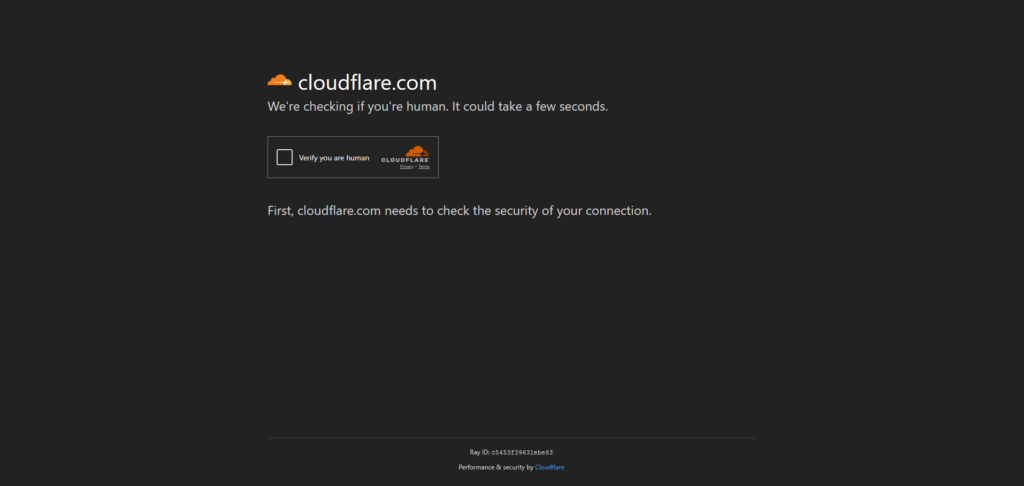
What’s different is what happens after you click the checkbox. With a real Cloudflare verification, you may have to do a small puzzle, but most likely the box will just become a checkmark and the site will load. With the fake version, a new box with Cloudflare branding pops up, asking you to use a series of keyboard shortcuts to do an extra verification step, then press a button to confirm you’ve done it.
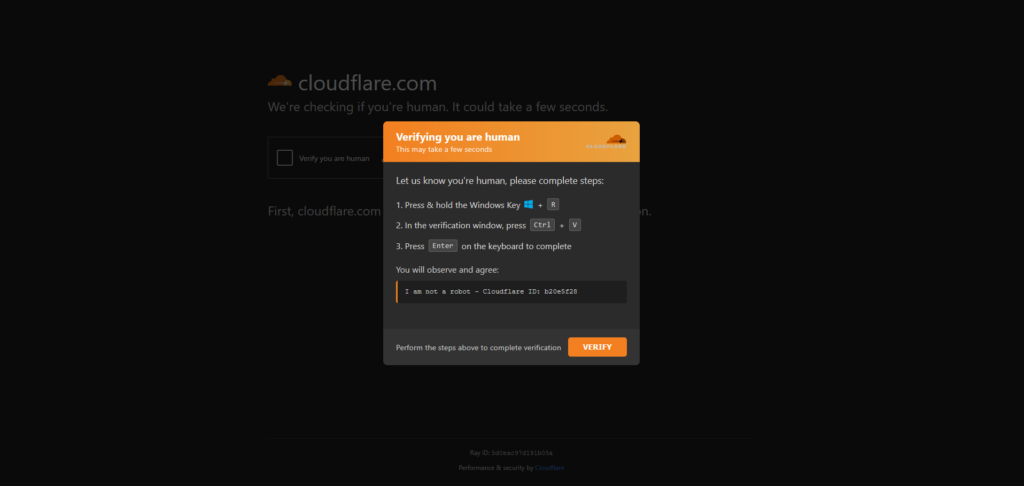
Even though it’s pretending you’ve just verified you aren’t a bot and used the logo of a known and trusted company to do it, you’ve really done the hacker’s work for them. They didn’t have to compromise anything or do the hard work of breaking into your device. When you followed the instructions, you installed their malware yourself.
What You’re Really Doing
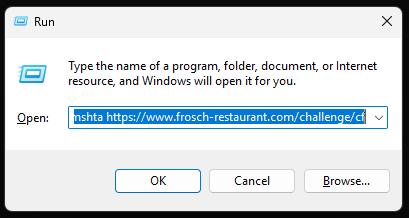
When you check the box on a fake Cloudflare verification screen, a hidden piece of JavaScript activates. It automatically copies a small string of text into your clipboard. This isn’t actually a compromise. It uses the same mechanism as any legitimate “click here to copy this text!” button you’ve seen online, and because it’s stored as text, it can’t actually infiltrate your device from there. The malicious part is what comes next.
The instructions want you to press Windows + R, which opens the “Run” dialog box on your computer. The next step is to press Ctrl + V, which pastes that string of text into the dialog box. Then it wants you to hit Enter to execute. When it was stored in your clipboard as text, it couldn’t hurt you. But once you press Enter, that small string of text executes, becoming a malicious command to your computer. That command runs whatever kind of malware the hacker feels like using.
Why It Works
The real genius of this tactic is in the details. Hackers may create a fake website, or they may put the fake Cloudflare verification page on a legitimate but compromised site. The page itself is a self-contained file, which means it flies under the radar of most website security systems. Because your device isn’t compromised and there’s no malicious files downloaded until you yourself press the Enter key, it won’t trip any of your computer’s security warnings, either. Most security and antivirus programs focus on watching for unauthorized and suspicious downloads – not things you download or run yourself.
And on the human side, it works because we’re very familiar with these kinds of security checks. If you’re on the internet for any length of time, you’re sure to come across the legitimate Cloudflare verification on a fairly regular basis. There’s also a concept called “verification fatigue,” which is when people have to verify themselves so much that they stop paying close attention to the actual steps involved and just follow instructions. So this scheme exploits both a legitimate brand’s name and our familiarity with these kinds of security checks to trick us into putting malware on our own devices.
What to Know About Fake Cloudflare Verifications
In this situation, knowledge and awareness is the best protection. Being aware that this threat is out there and knowing how it works and some of the details will help you spot it – and therefore avoid it. These are some key facts about these fake Cloudflare verification pages.
Windows + R opens the Run dialog box. The Run dialog box is essentially an all-access pass to every area of your computer. It can open programs, run scripts, access menus, and more. You shouldn’t put anything into the Run dialog box unless you’re 100% sure of what you’re doing – and no legitimate security check will ever need you to do so.
Clicking the box isn’t actually dangerous. When you click the box on a fake Cloudflare verification page, it just automatically copies some text. This text can’t hurt you unless you use something like the Run dialog box to execute it. So you don’t need to be afraid of every Cloudflare security check you find. (Which is good, because it’s almost impossible to tell the fake ones from the real ones!) You only need to be cautious if it starts telling you to press Windows + R.
If you find a fake Cloudflare verification, leave the site immediately. You may have found a fake website, or you may be on a legitimate website that a hacker has gotten access to somehow. Either way, close the tab or browser window immediately. And whatever you do, DON’T follow the instructions!
What to Do if You Followed the Steps
If you did run into a fake Cloudflare verification screen and followed the steps, your device now has malware. What kind of malware depends on what the particular criminal who put up the fake verification was trying to do. It might be spyware, ransomware, or something else. Regardless, it’s time to do some malware recovery.
Your first step should be to disconnect the device from the internet. This will prevent the malware from sending any more of your data somewhere else. It can also protect other devices on your network from getting infected. If it is a work computer, also let your company’s IT department know.
Next, run your antivirus program and follow its recommendations. Unfortunately, this scheme’s malware tends to be stubborn and sneaky. Your antivirus may not find it all. The safest option is to wipe your device and reinstall the operating system. You can also take your computer to a repair shop for help.
If the computer was connected to your home internet network, it’s also important to make sure of your network is secure. Run antivirus on all your other devices. If your antivirus has an option to check your entire network, do that. Also look at this article for suggestions to secure your router.
Next, report it. If you’re certain the fake verification was on a legitimate website, contact the webmaster and let them know. You can also report it, with as many details as you have, to the FBI at ic3.gov.
Finally, stay alert for signs of identity theft and for other scams targeting you. If the malware stole your information, the hacker may be using it or selling it to criminals who want to do other things with it. Stay alert for signs of trouble.
Protect Yourself in Advance
The first step to protecting yourself is always to be aware of the threat. You can’t protect yourself from something you don’t know about. Reading this article is a great first step. Another good thing to be aware of for the fake Cloudflare verification scheme and any future trick that uses similar tactics is keyboard shortcuts. Some combinations of keys on your keyboard, pressed at the same time, do specific things on your computer. This tactic takes advantage of that to disguise a malicious command as a simple verification process. Knowing what keyboard shortcuts do can help you identify when something is asking you to do suspicious things.
On the technological side, there are two main steps you should take to protect yourself. First is installing an antivirus software. If you don’t have one, get one right away! (We have recommendations in this article.) This particular trick sneaks around many antiviruses, but they’re improving all the time. And they’ll protect you from other malware threats. The other step is setting up backups for your computer. Backups ensure that if you have to entirely wipe your device to get rid of malware, you don’t lose all your files. You can use an online backup service, or even just copy everything to an external hard drive on a regular basis. The important thing is that your files are stored somewhere else just in case.
Finally, share this knowledge! You now know what’s suspicious, what not to do, and how to respond if you come across this threat. But what about your parents? Or your kids? Or your friends? Tell them what you’ve learned, or send them this article. Help them protect themselves from this threat, too.
Related Articles
- All
- Easy Prey Podcast
- General Tech Topics, News & Emerging Trends
- Home Computing to Boost Online Performance & Security
- IP Addresses
- Networking Basics: Learn How Networks Work
- Online Privacy Topics to Stay Safe in a Risky World
- Online Safety
- Uncategorized

Online Sports Betting: Harmless Fun or Exploiting Fans?
You’ve almost certainly seen the ads somewhere. Make money from being a sports fan! Bet just a…
[Read More]
Fake Businesses on Google Maps May Lead You Into a Scam
Imagine this: You’re coming home late one night, exhausted and ready to fall into bed, and as…
[Read More]
What is a Chatbot? Here are Some Basic Facts and Views.
Still, it’s clear that once explored and used, ordinary people discover how extremely useful, powerful, and different...
[Read More]

What is ID.me? One Day, You Might Need to Know.
If a friend asked you, what is ID.me, would you be able to answer? You really should,...
[Read More]
Job Opportunity Scams: Beware If You’re Looking for Work!
Getting a message from a recruiter when you’re looking for work seems like a good thing. But…
[Read More]