
Uses of Virtual Machines: Security and Flexibility
It’s possible you’ve heard of virtualization or using virtual machines (VMs) before, but have you ever tried to use a VM yourself? Isn’t virtualization some sophisticated process that only enterprise businesses need, and only IT experts know how to do? Not necessarily.
Virtual machines have several practical applications for individuals. They’re especially useful for people who like to tinker with operating systems and legacy software. Before you can learn about the ways to use a virtual machine, you should probably know what a VM does.
What is a virtual machine?
A virtual machine is like a computer inside a computer. It performs all the same functions as a second computer without additional hardware (CPU, RAM, hard drive, etc). When you install a virtual machine on your existing computer, it will use all the same resources to run an operating system, programs, and apps.
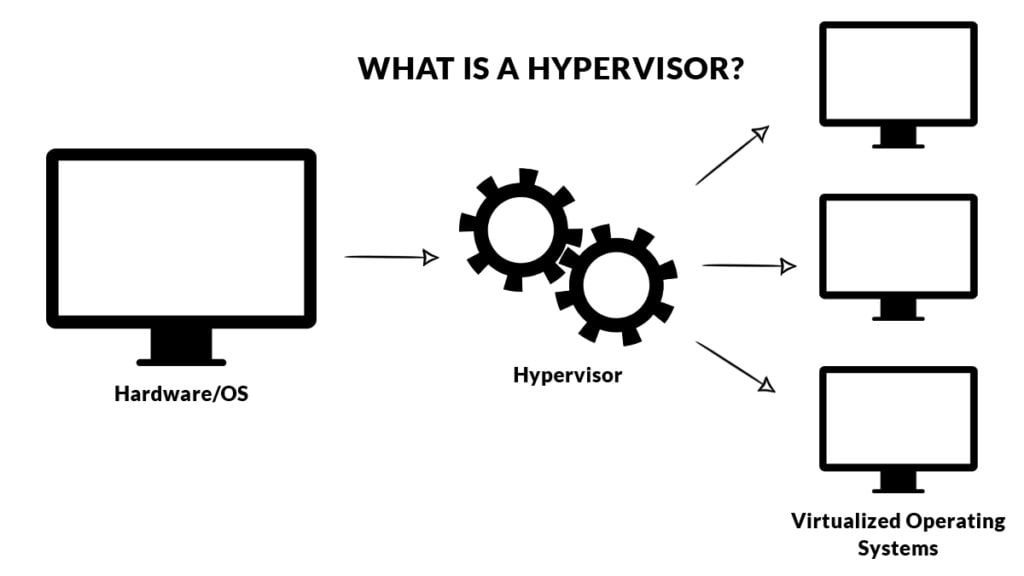
VMs run on hypervisors. A hypervisor can be hardware, software, or firmware, that creates and operates virtual machines. Say you want to use a virtual machine on a PC running Windows. When you install it, you can use the hypervisor to manage how much of your PC’s resources (such as RAM) are used for your Windows OS and how much to allocate to your virtual machine’s OS. When you start using one on your personal computer, you’ll need a hypervisor to run it.
Are virtual machines secure?
Because a virtual machine is isolated from your host computer, you might think that it’s more secure. But keep in mind that having a VM is like having a second computer. It’s still vulnerable to the same attacks your host computer would be. Using a virtual machine to browse the Internet doesn’t mask your IP address or automatically shield you from threats. And although your VM and host computer are technically separate, some things could still be shared between the two if you’re not careful.
Items copied to the clipboard and certain folders can be shared between a VM and host computer, as can a network connection. A worm is a type of malware that infects an entire network, not just one machine. If you’re using the same network connection to browse the Internet on your VM that you use on your host computer, both can become infected by a worm.
Not all viruses will infect your network, however. Many will only affect the machine and unless a certain malware is specifically designed for exploiting weaknesses in virtual machines, it very likely won’t infect the host computer.
The chances of malware moving from a virtual machine to your host computer are slim, but you still need to take precautions to secure your VM:
- Keep your VM software (called a hypervisor) up to date
- Isolate your VM completely (don’t share any files at all)
- Practice good Internet security if you browse the web on your virtual machine
Advantages of virtual machines
A physical host computer can run multiple VMs, which saves physical space and cuts down on time and management costs. If you want to run a legacy application that’s no longer supported by your current operating system, you can run it in a virtual machine. You can also dedicate a VM to a single purpose, such as supporting a specific process.
Disadvantages of virtual machines
Virtual machines have several benefits, but they do come with downsides. For instance, you need a sufficient infrastructure to run multiple virtual machines on one host computer. Without it, performance on both your host machine and virtual machines will be poor. Because they’re not operating with their own hardware, virtual machines are also slower and less efficient than full computers. If you’re a single user running one virtual machine on one desktop computer, you’re less likely to have serious performance issues, though.
Using virtual machines: practical examples
If you aren’t running a large corporation, you can still benefit from using a virtual machine. These five examples show what’s possible with virtualization as an individual user.
1. Experiment with a different operating system
One of the primary reasons people use virtual machines is to work with a different operating system without having to buy a new physical computer or uninstall their current OS. You might be a Windows user who’s curious about Linux and wants to try it in a VM before giving up Windows completely. Or you want to keep using Windows for some tasks, and Linux for others.
2. Run outdated software
There might be legacy software or operating systems that are no longer supported, but you still want to run them. You can create a virtual version of an old OS, like Windows XP, and install the old software on your VM without a problem. It’s safer to sandbox old programs in a VM this way because they’re more protected from external threats like malware or viruses.
3. Build a malware analysis lab
One principle that goes hand-in-hand with virtual machines is sandboxing. A sandbox refers to an isolated space where software can run without impacting the rest of your computer. If you install an internet browser on your VM, go to a malicious website, and download a virus, that virus won’t spread to the rest of your computer — it’s contained within the virtual machine. This capability makes VMs ideal candidates for malware analysis labs. With a VM, cybersecurity analysts can download known malware to take it apart and see how it affects a system, without the risk of harming their computer.
4. Develop apps for different platforms
App developers use virtual machines to see how their program will perform on a different OS. You can emulate a mobile OS with a virtual machine to test an app, without having to transfer files from your computer to another device. It also allows you to test the Windows and macOS versions of your software from the same machine.
5. Clone your system
A virtual machine only stores its contents in a few files, so you can transfer them to another host computer easily and boot up your VM without any issues. The only trick to cloning your system is to use the same hypervisor. If you use VirtualBox as your hypervisor on one computer, you’ll have to run your cloned VM on VirtualBox on the computer you transfer it to.

Popular virtual machine software
To run a virtual machine, you need a hypervisor. Remember, a hypervisor can be software, hardware, or firmware. The most common hypervisors for individual users, however, are software. There are several software options you can download and install to get a VM up and running, and some of the most popular choices are:
- VirtualBox: VirtualBox is the best free option for VM software because it works for Windows, Mac, and Linux users. It also has 100,000 registered users and a growing developer community, so you can find support when you need it.
- VMWare Workstation: VMWare Workstation is the gold standard of personal-use VM software, with enough functions to cover just about anything you want to virtualize. It’s free for personal use and you can even create and run VMs from other vendors within the VMWare virtual machine. It’s also compatible with Windows, Mac, and Linux.
- Parallels Desktop: Apple users can use the free tool Bootcamp to run a virtual session, but it’s not as robust as Parallels, the Mac-only VM software. Parallels Desktop isn’t free but their basic edition is affordable.
- Hyper-V: Hyper-V is Microsoft’s VM offering and it’s fairly limited compared to other virtual machine software on this list. But it’s free and easy to use for those inexperienced with virtualization. The Hyper-V VM can support some Windows and Linux operating systems.
- QEMU: QEMU stands out because it’s both a hypervisor and a machine emulator, meaning it can virtualize hardware as well as operating systems. It can only virtualize Linux, but it’s compatible with host machines running macOS and Windows.
Are virtual machines illegal?
Using a virtual machine is perfectly legal. However, you might run into issues if you don’t have licensed versions of the operating system or software you’re running within the virtual machine. For example, if you want to run Windows 10 on a virtual machine in addition to the Windows 10 you run on your host computer, you will need two Windows 10 licenses to keep it legal.
Also, Apple doesn’t allow users to install macOS on non-apple machines or devices. If you want to install a virtual machine that runs macOS, your host computer must also be running macOS. However, some users attempt workarounds, such as MAC address cloning, to bypass certain restrictions, which can raise ethical and security concerns.
Using a virtual machine
Getting started with a virtual machine can be exciting because it opens up a lot of possibilities. Now that you know exactly what you can use a VM for, and the most popular VM software, you’re ready to get started!