
Internet Privacy Myth: You can’t keep spies out of your online life.

Our internet privacy is under siege for sure, but you can fight back (and win) with a VPN.
A recent survey indicated that many people are more worried about losing their internet privacy than they are about being hacked.
- There is no such thing as online privacy. Virtually every move you make is tracked by websites or advertisers or some entity using technology to monitor your activity.
- With or without a subpoena, a government agency can monitor a person’s interests, activity or behavior.
- Even our Internet providers will share, and sell, information about our online activity.
How is this possible? How can they do it without our permission?
Here’s how. They match Internet activity to our IP address, which is something like a phone number for an active Internet connection. And there are many places where you leave your IP address online for anyone to grab…and then to peer into your life.
You might be thinking there’s nothing you can do about it.
Not true! You can reclaim your online privacy by using a Virtual Private Network…a VPN.
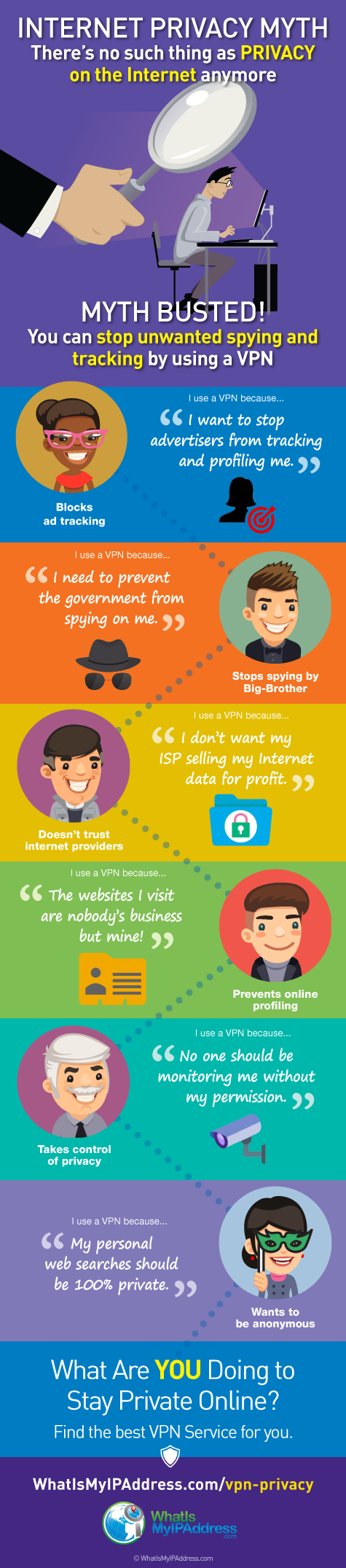
Share this infographic on your site:
A VPN is your ticket to regaining your internet privacy.
Nobody wants to believe that their government might be spying on them, but it happens. We don’t want to believe our ISP (Internet Service Provider) is tracking our activities online (and selling that information) but they’re doing it. And we can’t imagine a hacker stealing data in transit and seeing what we’re doing, but they always try.
These are the realities of our day with the technology we all use. Our privacy has been diminishing for years, and it can feel hopeless. The good news is, you can fight back and regain your privacy.
Use a VPN and regain some of your internet privacy!
Maybe you’ve heard about VPNs before, but haven’t gotten around to using one for yourself.
It’s time you did.
A VPN can help you prevent outsiders from sticking their noses in your private life, personal business and online activities.
Click to learn how a VPN can help you get more Internet privacy.
5 Internet Privacy Tips to Help You Protect Your Identity
Here are a few easy but important internet privacy tips that can help you better protect your identity.
In our globally connected world, we all have to interact with companies, friends, employers and coworkers online. That means much of your information is stored, shared and accessible online, even to people you don’t know.
Need proof?
Pay close attention to how you use the internet and interact with web services, and you will immediately notice the large volume of data you willingly share online. Social media posts, photos uploaded to the cloud, your search and browsing history, and everything in between are data sets with immense value in to advertisers and businesses.
If you are feeling overwhelmed, there is more good news: privacy protection isn’t as difficult as you think. Through the use of simple security tips and tricks we are about to discuss in this article, you too can start maintaining a higher level of privacy online. Let’s get started!
Internet privacy tip #1: Know What (and When) You Share
The first thing you can do to limit the amount of personal data you share online is, well, not sharing it. Not every little thing in your life needs to be shared on Instagram, Facebook or Twitter, after all. Worst of all, these companies might be tracking you even on seemingly unrelated web pages.
This is why you want to drop the habit of staying logged in to social media sites while browsing the internet immediately. When you have your Facebook account logged in, for instance, the social networking site can track you beyond Facebook using a tracker known as Facebook Pixel. Every time you come across a Facebook ad on another site, Facebook learns something new about you.
Logging out is also good for when you want to browse the internet in a neutral way. You can stop worrying about ads targeting you specifically or price aggregators altering internet prices based on your interest level.
Internet privacy tip #2: Delete Cookies
The next thing you want to do is regularly delete cookies produced by websites. This is a tedious process that needs to be done regularly, but the hassle is nothing compared to the level of privacy you gain in return. Every tracker on the market today uses cookies and sessions to keep track of you across the World Wide Web. Deleting cookies limits their ability to effectively collect information about you.
Cookies pose security risks on their own. While most cookies don’t really contain sensitive information, they still say a lot about you as an internet user. Should cookies fall into the wrong hand, the data they contain can be processed and used for malicious intent.
Some browsers now let you clear cookies and browsing history automatically every time you close it. There are also ways to automate the deletion of cookies periodically. If manually deleting cookies isn’t something you want to do, these automated methods are great alternatives to look into.
Internet tip #3. Stick to Secure Networks
Public Wi-Fi networks are incredibly useful, but they are not the most secure way of connecting to the internet. Public Wi-Fi networks lack the security measures you normally find in office or home networks; in other words, most of them are unprotected. Unprotected Wi-Fi networks expose you to more risk of information theft and data sniffing.
Instead of relying on unprotected Wi-Fi networks, stick to secure ones. A security measure as simple as WPS is better than no security measure at all. Secure Wi-Fi networks in public places are becoming more common too, so you don’t have to sacrifice convenience for privacy.
Privacy tip #4. Remove App Permissions
The biggest attack surface when it comes to privacy, however, is your smartphone. It is a device that goes with you all the time. It is also a device that gets actively used throughout the day. A smartphone can reveal a lot about its users — too much, in fact.
Apps, with the right permissions, can access quite a lot of information on your phone. Some apps even ask for permission to access your call and message logs, your stored Wi-Fi networks, and the photos or files you store in the device. These are the details that must remain inaccessible.
If you haven’t been paying attention to the permissions you give to apps, now is the perfect time to do a thorough audit. You can go through the apps on your phone one by one or use trustworthy review apps to automate the process.
Internet privacy tip #5: Mask Your IP Address
Of all the internet privacy tips shared, this might be the most important. There are details that we share willingly and information that servers can collect automatically. The IP address you use to connect to the internet gets logged every time you access a server or a web service. That IP address actually reveals a lot of details, including the ISP you use and your approximate location.
If you want to learn more about masking your IP address and preventing others from tracking you that way, reading our article on hiding your IP address.
One of the top recommendations you’ll read about it using a VPN, a Virtual Private Network, to hide or mask you IP address on demand. To learn more about VPNs, if you’re new to the topic, read our own article on IP address basics.
However, if you want to cut to the chase and see the top VPNs for privacy, visit our VPN Simplifier page on privacy here.
These are the internet privacy tips that you can implement right away. They are simple enough to implement, but they have a big impact on your privacy online. If you want to start protecting your privacy whenever you use the internet, these are the tips to use.
Boost Your Social Media Privacy: 7 Effective Ways

Social media has become a part of our everyday lives. And yet, we take for granted how much information is readily available on social networks. The focus is on friends or building follower counts but random people can sneak through the cracks and they may not have the best intentions. A quick search could get them your mother’s maiden name, address, and so much information you may not even realize is lurking in your socials. Not to mention, all of your data can be monetized, weaponized, and capitalized on. To protect yourself, take steps to protect your social media privacy.
The cost of your personal data
Social networks aren’t ever “free.” We pay for them with our information. Surveillance marketing and behavioral targeting are just a few of the ways these sites monetize your information. Using the data you share, social networks can market to you or share your information with big brands. And that means tons of ads.
We may rush to post and “do it for the ‘gram” but oversharing on social media is just one of the many ways to end up the target of advertisers, cybercriminals, and stalkers. Posts can be public, get crawled by search engines, and potentially even syndicated on websites. This means your information can be available for the whole world to see.
Your information is where the money is at. This can be for the social network itself or for hackers, grifters, and thieves. They may want to get their hands on your credit card or social security number, your identity, or even your cryptocurrency. Oversharing on social media can be a huge problem.
Social media can put a kind, cute, or even innocuous face on a profile and send you a request. You’ll naturally click yes. Once they have access to your socials, someone can target your friends, clone your profile to steal some of your business, or worse.
Social engineering evolves with the times. It’s important to take stock of what information is available, what your privacy options are, close some of these security gaps, and shore up your social media.
1. Review the privacy policy
We scroll through terms and conditions and privacy policies and can miss vital information. Some of our favorite apps and social media networks have complex legalese that we ignore. We can miss some of the rights we sign away to use our favorite social networks.
It’s important to at least skim some of these privacy policies and user agreements. You want to make sure you look at the rights to your information, photos, and who these social networks are sharing that information with. Norton recommends checking these terms for your own safety.
2. Check your settings
Social media privacy is a major concern. After the revelations of the Facebook whistleblowers and the passing of laws like California’s California Consumer Privacy Act (CCPA), pressure from politicians means social networks will have to give options to protect your information. But they aren’t going to tell you what settings best protect your interests. Staying aware of your settings can let you keep track of what information you want to keep private. It’s good to schedule an annual check-in.
3. Go private
Social media can be transformative for businesses or for influencers. But let’s be honest, a lot of large brands and huge celebrities are not managing their social media on their own. It’s worth considering going private. After all, even influencers curate their social media. Just because your favorite stars are sharing their whole lives on social media doesn’t mean you have to. It also doesn’t mean that they don’t keep some things private.
Keeping your Twitter or Instagram private means you can have a stronger grip on who gets to see your information, family photos, and vacation pics. The fewer people accessing your social media profile the safer your data will be.
4. Watch when you post
It’s a natural urge to want to post about a restaurant or tourist attraction in the moment. But even celebrities and influencers don’t post their exact whereabouts for fear of their safety. So why should you? Everyone on your social media list doesn’t need to know where you are at all times. Posting photos broadcasting where you are and what you’re doing can put your safety at risk. Stalkers, thieves, and other problematic characters will know when you’re not home or where to find you.
5. Keep an eye on who you add
Networking works for everyone. But not everyone who sends you a request or follows you on social media has the best intentions. Many accounts can be set up to catfish you, set you up for a phishing scam or try and collect information about you. In the interest of networking, it’s always a good idea to look at who is following you, watching your stories, and interacting with your social media profile. You can also talk to someone before you add them. That way you can block suspicious characters to preserve your privacy.
6. Be careful of bots
Bots are on the rise. They’re a tool in the arsenal for hackers who want to co-opt your information on social media or manipulate the algorithms. Be wary when you see form comments or get messages from random bots. Instagram is flush with fake accounts that will clone an account and impersonate friends to try and get you to click on phishing links, download malware, give up personal info, or ask for financial help. Sometimes even by engaging with these accounts, you can put your account at risk of getting cloned.
7. Lie
Maybe you don’t have to have your real school, work history, and family relationships online. Maybe you have your resume on LinkedIn and your friends on Facebook and keep some information cleverly concealed. This may seem paranoid but you’d be surprised at how inventive cybercriminals can be. Not to mention, too much transparency online can come back to bite you. Sometimes, it’s best to have healthy boundaries with what you’re posting.
Social media isn’t going anywhere. But your privacy shouldn’t be up for grabs just because you want to chat with your friends about Ted Lasso or post photos of your dog. Hopefully, these tips have given you some tools to better protect yourself and keep your private information, photos, and opinions out of prying eyes.