
Geolocation: How It Works and How to Protect Yourself
Real life technology has finally caught up with the movies. From The Bourne Ultimatum to The Matrix, geolocation trackers played pivotal roles that often led to thrilling chases and spy showdowns.
The geolocation technology that exists today isn’t quite as exciting as these film storylines, but despite its perceived detractions, it offers many benefits that you probably unwittingly utilize every day. The internet would be a dysfunctional mess without geolocation.
But what is geolocation, exactly? And does your IP address show your location to anyone who wants to access it? A helpful starting point is understanding what does IP address reveal in everyday use. In most cases, it points to network-level details like your ISP and a general location estimate, not your exact home address. Let’s take a look.
What is geolocation?
What is geolocation, beyond a futuristic, faintly Orwellian–sounding technology? Geolocation utilizes various methods to determine the location of your smart device. The accuracy of geolocation depends on the method used. Some geolocation trackers can pinpoint the exact location of your device, down to the street address. Others may discover your country, state, city, or neighborhood.
Many different types of software can determine your geolocation, including:
- Bluetooth signals
- Cellular towers and networks
- Global Positioning Systems (GPS)
- IP Address trackers
- Wi-Fi
The history of geolocation
Geolocation has been a lot longer than you may think. Although the technology has evolved over the past 60 years, a form of geolocation was first used in the “Doppler Effect” system (the precursor to GPS systems) used to track submarines.
GPS is regulated and owned by the U.S. government and used by the U.S. Air Force to manage the collective civil, commercial, homeland security, national defense, and science-based needs of the country.
However, especially over the past 15 years and with the evolution of smartphones, GPS and other geolocation technologies have been utilized by private corporations as well.
How geolocation works
Geolocation works by collecting, processing, and transmitting data. Geolocation databases are utilized by ridesharing services, streaming platforms, e-commerce sites, and more. A device dedicated to geotracking collects data from cellular tower and WiFi pings, GPS signals, and other services.
The device then transmits collected data to the cloud or to a central, dedicated server.
The collected data is then analyzed and processed to triangulate a location by measuring the distance between your device and the signal or ping.
For example, say you’re looking for a Sushi restaurant near you via your phone’s internet browser. The results that appear might include restaurants within a mile of your current location.
This is possible because your cell phone transmits a signal to a local cellular tower, and collected data determining your phone’s location is then processed and analyzed within seconds.
IP address geolocation accuracy
IP address geolocation can provide useful location insights, but its precision depends on several factors. At the country level, results are usually very reliable, with success rates above 95%. However, accuracy declines as the scope narrows to regions, cities, or neighborhoods—city-level data may only be correct 50–80% of the time, and rural or mobile connections are often even less consistent.
Mobile IPs, for example, are often routed through carrier gateways that can be located hundreds of miles from the actual device, or assigned from pools of IP addresses that are geographically diverse, making the reported location misleading. VPNs and proxy IPs also pose challenges since they are designed to mask a user’s real address, so the geolocation often reflects the server’s location rather than the individual’s. Satellite internet IPs can be equally problematic, as traffic is funneled through a limited number of ground stations that may be in a completely different state or region.
What is an IP address?
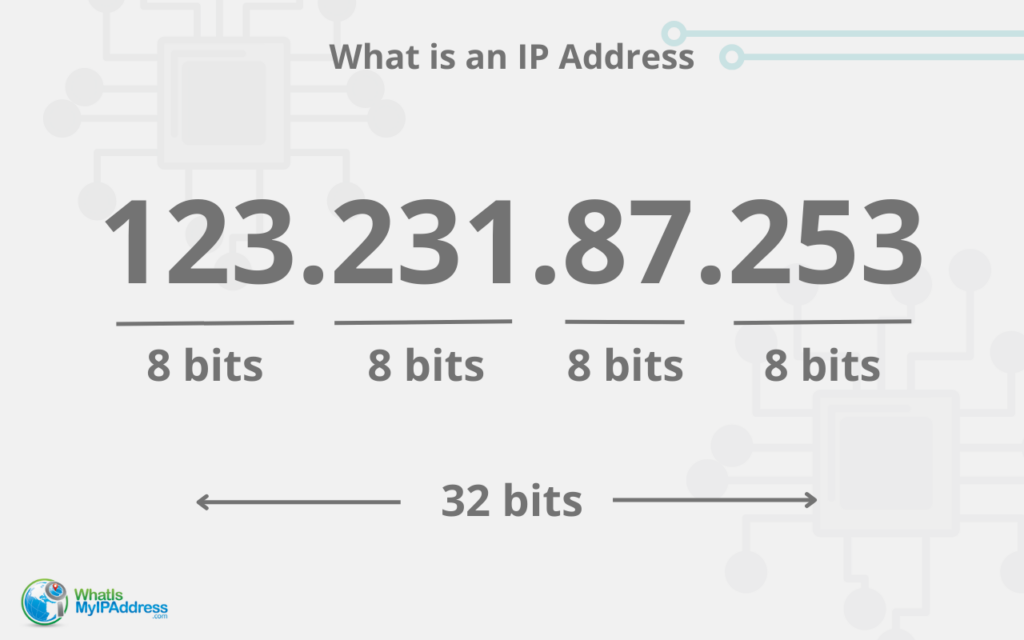
You may already know that every time you hop online, your activity is attached to an IP (Internet Protocol) address. From printers to laptops to smartphones, across the globe each smart device is assigned an IP address.
An IP address is a unique string of identifying numbers that allows you to connect to the internet and gives you access to unrestricted content. Your home IP address, known as a static IP, is assigned by your Internet Service Provider (ISP) and doesn’t change.
An IP address works similarly to a street address. When your device wants to connect to a server and collect or transmit data, that data needs to know where to go.
For example, if you mail a letter addressed to Joe Smith Baltimore, Maryland, the envelope may reach Baltimore, but it will never reach your intended recipient. IP addresses work in similar ways.
A website can only receive a specific request for data if it has a unique IP address, and also needs a unique address in order to fulfill the request and deliver the data — without IP addresses, the internet would not be able to function.
Does an IP address show your geographical location?
In short, yes. An IP address does show your geographical location. However, it doesn’t specify your street address, or typically, even your neighborhood. Nevertheless, an IP address may reflect your general location, including your region, county, city, zip code, or area code.
Although you may have a permanent IP address if you’re connecting to the internet from your home, your IP address changes every time you move locations. Nevertheless, the IP address geographical location might remain the same.
For example, if you scroll through social media while waiting at a neighborhood bank, you’ll have a different IP address than you have at home. If you then check your email from the drive-thru of a fast food restaurant two blocks away, your IP address will change once again. Yet, your physical location identifiers will reflect the same geolocation.
How IP addresses reveal your location
IP addresses can reveal your location through IP geolocation, a method that analyzes data, IP addresses, and routing information to roughly determine where you are connecting to the internet.
However, geolocation through an IP address isn’t 100% accurate. On average, geolocation accuracy that reveals the state you’re connecting from is 55%-80%, and accuracy in determining your city is 50%-75%.
Benefits of geolocation
The idea that a cybercriminal may track your geolocation through your IP address is scary. Yet, this process will never reveal your exact address or lead to a horror movie moment with a villain who uses the internet to discern what room you’re in at home.
Many industries use geolocation services to add extra cybersecurity and protection for their customers, including banking, telecommunications, travel, hospitality, entertainment, and law enforcement.
Some of the numerous benefits of geolocation include:
- Better customer service
- Reduced time of food deliveries from companies like Uber Eats, and package deliveries from Amazon, UPS, and more
- Fraud detection
- Fuel efficiency and reduced costs
- Improved driving
- Increased brand awareness
- Increased productivity
- Monitoring of dangerous online criminal and terrorist activity
- Prevention of phishing attacks and other security or data breaches
- Local business success
- Theft recovery
Cons of geolocation
Unfortunately, when geolocation capabilities fall into the wrong hands, your cybersecurity can be threatened. Here are some of the ways cybercriminals might use your IP address to target you:
- Exposing your cybersecurity vulnerabilities
- Stalking
- Steal your identity and personal information
- Targeting you for phishing attacks, identity theft, and more
- Track and profile your internet habits to sell on the dark web or to unwanted advertisers
How to hide your IP address
If public IP addresses make you uncomfortable, there are simple ways to hide your IP address and protect yourself from hackers, including:
- Using a VPN (Virtual Private Network): A VPN, like CyberGhost or NordVPN, cloaks your IP address and allows you to spend time online without getting hacked or targeted by tracking cookies. VPNs also allow you to bypass geo-restrictions, encrypt your data, and enhance your cybersecurity.
- Using a Proxy Server: A proxy server can also hide your IP address and geolocation. Rather than directly connect your device with a website, a proxy request reroutes your activity through a proxy server. Thus, your IP address is hidden when you connect to any websites.
- Virtual IP Addresses: A virtual IP address breaks up online traffic jams, and utilizes unique addresses for each application on a host server. The virtual IP is assigned via a host server, and is a dynamic IP address, which means it constantly changes and will not accurately reflect geolocation.
Visit What Is My IP Address to access our free online privacy tools like the Personal Data Scan, and track someone else’s IP address by tracing their email address source. Check out our Easy Prey podcast and our blog to discover more cybersecurity tips.
Related Articles
- All
- Easy Prey Podcast
- General Tech Topics, News & Emerging Trends
- Home Computing to Boost Online Performance & Security
- IP Addresses
- Networking Basics: Learn How Networks Work
- Online Privacy Topics to Stay Safe in a Risky World
- Online Safety
- Uncategorized

A Former Fraudster’s Tips for Protecting Your Personal Information in a Connected World
Technology is evolving so fast and is ever increasingly integrated into our world. It’s becoming less and…
[Read More]
Awareness and Safety Go Hand-in-Hand: Tips to Protect Yourself
Scams are often (though not always) technology-based, and physical danger happens in the physical world. But both…
[Read More]
We Created EasyPrey.com Scam Help Page to Help You
WhatIsMyIPAddress.com and our sister website, EasyPrey.com, focus on providing content and links to information and resources for...
[Read More]
EasyPrey.com Resources for Scam Victims
We’ve compiled a list of resources for all victims (and near victims) of scams, fraud, and identity…
[Read More]
The BBB Scam Resources Are There to Help You!
The Better Business Bureau is on YOUR side, helping consumers with real-time scam tracking, which you can...
[Read More]
Amazon Scams Come in All Shapes and Sizes. Are You Prepared?
Tell Amazon ASAP if you’re a victim of a delivery scam. Amazon takes fraud and scams quite...
[Read More]